Personal wikis
April 11, 2026 @ 21:33
No I can not shut up about notetaking software. That's the intro. Ok.
I realized a little while ago that the problem I had with my sort of "notetaking infrastructure" wasn't that I needed a separate place for random links and actual notes (Linkding and Memos), but that I needed a place for scattered random notes and more organized and structured things. I took a look at a few popular options. Things like Obsidian, Notion, SiYuan, etc., but a lot of them are kind of overwhelming or have features that get in the way (think Notion’s AI and subscription stuff, plus them being closed-source and). They make me sit there and wonder how I’ll ever utilize them to their fullest rather than just using them. This will seem very ironic when you hear what I have settled on.
For a little while I ended up using an OtterWiki hosted on my NAS as a place for longer, organized notes and things. I also liked that i could upload images and explicitly set a max size, allowing me to make little “image collection” pages as an alternative to Pinterest, Raindrop.io, etc.
I also ended up using Anytype for my project organization. Things like game design documents, a tasks kanban, and other writing in the more Notion-like format that Anytype has.
I was originally gonna write about how using the wiki actually seemed pretty good, and it is incredibly good and easy to use. I like having a hierarchical structure where a path can be both a note and a directory for other notes (i.e. /dev can be a custom page for general development stuff and then /dev/playdate is a page for Playdate-related stuff). I also like that Otterwiki just uses Markdown. I think if I need to host anything wiki-like in the future I will probably go with it. But despite this, I’ve moved again.
One other tool I briefly tried when I was browsing around is called Silverbullet. At first it looks like a fairly plain web-based Markdown editor, but it’s actually really cool. It has built-in templating, a really solid live-preview, and is completely scriptable through on-page Lua. What this means is you can write the lua on any page, and then it runs it.
One example I can think of is in the rendering of tables. In Markdown, you create a table like this:
|Section|Othersection|
|-------|------------|
|Hello|Hi|
|Wow|Cool|
And it will appear something like this:
| Section | Othersection |
|---|---|
| Hello | Hi |
| Wow | Cool |
You can do this in Silverbullet, or you can create a table by making one with lua somewhere on any page and embedding that table. The ${lua expression} syntax evaluates that expression and embeds the result, so I can instead define a table as:
x = {
  {Section="Hello", Othersection="Hi"}
  {Section="Wow", Othersection="Cool"}
}
and then by calling ${x} it shows as a table the same way.
Since everything is markdown you can also use standard markdown frontmatter. This is extra yaml-formatted data put at the top of a markdown file that can be used in various ways depending on the tool. Right now, this post’s frontmatter is:
---
layout: post
title: 'Personal wikis'
date: 2026-04-11T15:33:34.882-06:00
categories: []
tags:
  - post
---
The date is automatically generated when I initialize this post template, the title is converted into a heading and RSS feed title when I compile the blog site, and the tags are used by my markdown editor to categorize the file. What you can do in Silverbullet is write a query that will automatically find all pages with certain tags, and display it in a certain way. If i just wanted to show all posts in their standard, unmodified Lua table form I can call ${query[[from o = index.tag "post"]]} which gives a big table of all the information about each post. I can then refine it and make a little chronological list that links to each one with a template that just takes in an object and formats it a certain way, done like this:
${template.each(query[[
  from b = tags.post
  order by b.date desc
  limit 10
]], templates.blogItem)}
This orders the last 10 posts by date. Templates.blogItem is a custom template that just tells it what parts from the post objects to display, how. Rather than showing it as an item in a table, it takes certain parts out of the table and sends back some nice markdown.
--imagine a page object being passed in that's something like
page = {
  date="2021-06-25",
  title="Cool post",
  ref="posts/coolpost.md"
  name="posts/coolpost"
}

templates.blogItem = template.new([==[
* [[${ref}|${title}]](${name}) ${date}
]==])
This might seem unnecessary or complex, maybe it is, but the main thing for me is I can put these literally anywhere and it just does it. I can write lua that does whatever and make custom commands to do all that too.
The first command I wrote was one to create multiple side-by-side images. Markdown doesn’t really have any special syntax to allow for resizing or placing images next to each other, but it does allow for you to directly use HTML. In Silverbullet you have to put the HTML into a ${widget.htmlBlock("your html here")}*, so I made it so typing /multi-image creates a multi-image HTML block (as seen in this post).
Because there’s functions for directly adding text, prompting the user, and your standard Lua APIs, you can just write a command like this to do exactly that:
slashcommand.define {
  name="multi-image",
  description="Display multiple images in a horizontal row",
  run=function()
    local amount = tonumber(editor.prompt("How many images?"))
    local width = 100/amount

    local images = {}
    for i = 1, amount do
      images[i] = editor.prompt("Image path")

      if images[i] == "" then
        images[i] = uploadFileHere()
      end
    end

    local block = ""

    for index, image in ipairs(images) do
      block = block .. "<img src='.fs/" .. image .. "' width='"..width.."%' />"
    end

    editor.insertAtCursor('${widget.htmlBlock("'..block..'")}')
  end
}
*Note that “uploadFileHere()“ is a function I made to prompt the user for an upload and return the path since that seemed useful to keep separate
function uploadFileHere()
  f = editor.uploadFile()

  page = editor.getCurrentPage()
  space.writeFile(page .. "/" .. f.name, f.content)

  return page .. "/" .. f.name
end
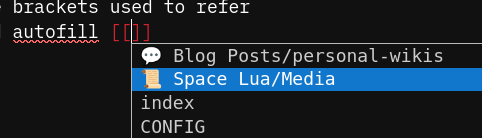
Even without creating extra functions and features, it’s still a fairly standard keyboard-focused Markdown editor with nice wiki functions like [[wiki links]] (double square brackets used to refer to an internal page without a full path) and autofill for said wikilinks.
It also doesn’t come with an asset manager, so unless you know the exact path of a file and visit it before running Page: Delete (or delete it by looking through the filesystem itself) they just stick around. I fixed that by making my own, which I will put in this post when I clean up the code a little bit. Basically it just queries for all uploaded files (literally just calls space.listDocuments()) And can either show you all of them, or just those for the page you’re currently on.
It’s got a lot of funky lua, and I can completely customize the homepage and the organizational structure, somehow without it feeling overwhelming or like I’m not doing it “right”. This may partially come from the fact that it doesn’t give you any sort of graph or tree view by default, those are plugins you can easily install, but even with the tree view it still doesn’t seem too bad. Strange.
I’m also looking for other potential replacements for Memos, because while I really hate to say it, it’s kinda falling off a bit. They’ve gone well into AI vibe-coding territory, and a lot of stuff they’re adding seems to be going against the simplicity it had before. Voice memos may be useful to some people I guess, but they’ve added a second button for uploading media? There used to just be one. Uploading images would embed the image and uploading other files would show a link to download them. Now, you can still do that with the upload file button, but there’s also an upload media button that does the same thing but has it limited to image and video filetypes? Odd. Rote seems kinda interesting and was made by someone who felt similarly, but it doesn’t feel quite right to me. Maybe I’ll make my own thing someday, or I’ll build a better notetaking feature in my Silverbullet instance. There are journal plugins, and I was able to overwrite the built-in “Quick Note” template to have some extra frontmatter. We’ll see where this goes.
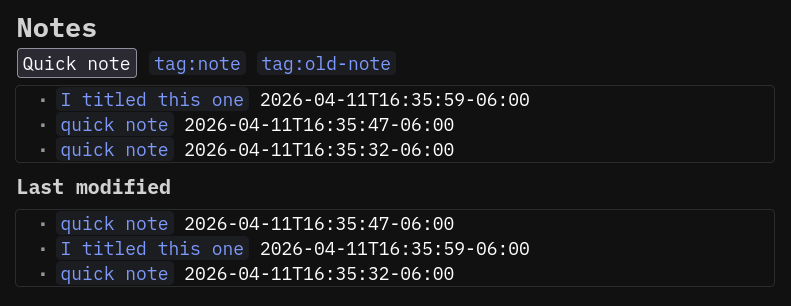
forgot to mention you can make buttons that run lua functions, or existing commands
It’s an odd thing, also difficult to try to summarize all my thoughts on this at once, but I hope this was something you read, or maybe even enjoyed!
My only complaint is there’s no demo instance for trying it out, but honestly it’s really easy to try even without Docker. You just download the executable and run ./silverbullet (folder to store everything in) and you can find it in your browser.
Try it out, or try out Otterwiki or Anytype, or whatever else interests you! I hate being locked into an ecosystem so I try to make sure I’m relatively capable of jumping ship, but I think this will probably be a relatively safe tool to rely on.
P.s. I wrote this whole post in Silverbullet as well, I copied over my existing template stuff and have a nice view for listing these here.
* Literally today the creator released an update allowing live preview for HTML tags directly. I didn’t even ask he just knew what I wanted
I also just learned I don't have Markdown footnote configured in Eleventy so I'll have to figure something out later.


